


CarbitLink-EasyConnection
3.0500.00 Reviews
App Specs
- Version
- 6.4.0
- Updated On
- License
- Free
- Downloads
- 5,000,000+
- Developer
- Wuhan CARBIT Information Co.,Ltd
- Categories
- Travel & Local
- Platform
- Android, iOS
Screenshots
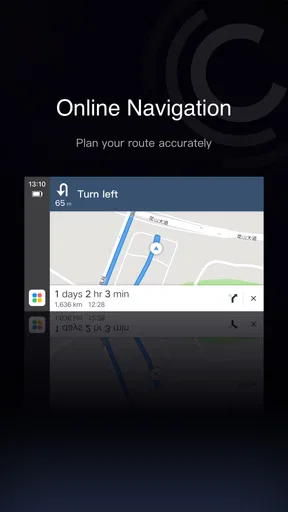
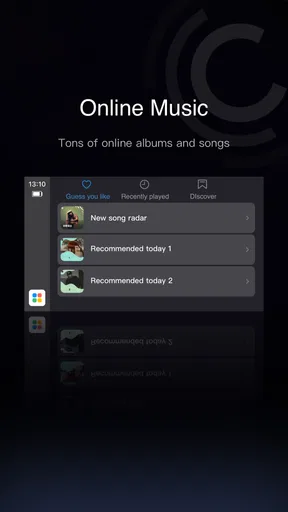
 Analysis by AppCompare
I approach CarbitLink-EasyConnection as a bridge between an Android phone and a car’s infotainment display, rather than as a replacement for every built-in system. That distinction matters: it is most useful when your vehicle supports the connection it expects, and less compelling if you already have a polished, dependable setup. Before counting on it for a commute, I’d test it while parked and work out how the phone and car behave together.
Where connection attempts can get stuck
The first hurdle is that “connecting a phone to a car” can mean several different things. A vehicle may pair with a phone for calls or audio without being able to display its screen, and a USB connection may behave differently from Bluetooth. Pairing alone is not proof that every part of the experience is ready. If the car’s display stays unchanged, I would first check what connection methods the vehicle’s own infotainment system supports instead of repeatedly opening the app.
That distinction also helps set expectations for mirroring. The idea is convenient because it can bring phone content onto a larger display, but it does not make every car compatible or guarantee that every app will behave comfortably on a dashboard. Screen layout, touch response and the vehicle’s own controls all affect how practical it feels. I’d treat mirroring as something to verify in your particular car, not as a universal shortcut around the limits of its built-in system.
Setup checks that save time
For a first attempt, park somewhere safe, unlock the phone and start with the connection route your vehicle recommends. If you are trying USB, use a cable that can handle data rather than assuming any charging cable will also carry a connection. If you are trying Bluetooth, confirm that the phone is paired with the intended car and that the car is set to the relevant phone or audio source. These are ordinary checks, but they can separate a setup problem from an app problem.
I would also avoid changing several things at once. Try one connection method, note what appears on both screens, then adjust only the setting that seems relevant. If the car prompts you to approve a connection, respond while parked. A clean first test makes it much easier to tell whether the issue is the cable, the pairing, the vehicle’s supported functions or the phone’s software.
Recovering a workflow when it drops
If a connection stops responding, resist the urge to troubleshoot while moving. Once parked, close and reopen the app, check that the phone still recognizes the car connection, and reconnect using the same method that worked before. If that does not help, disconnect cleanly and establish the connection again rather than rapidly switching between Bluetooth and USB. A consistent sequence makes intermittent behavior easier to diagnose.
It can also help to simplify the test. Start with one task, such as audio or navigation, instead of opening several apps and judging the whole setup at once. If one function works while another does not, that points toward a narrower compatibility or control issue. If nothing appears, revisit the connection itself before assuming the app’s interface is at fault. I would keep the phone where it can connect reliably without making it a distraction or an obstacle to driving.
Worth Reading Before You Choose

Flipboard Shows What News Apps Must Do Beyond the Feed

Switching to Android Auto Means Rethinking Your Driving Routine

Google Calendar Makes a Crowded Week Easier to Manage

Ludo King Makes the Most of the Minutes Between Plans

Baby Panda World Brings Quick Play to Modern Phones, but Its Game Library Feels Busy

ESPN’s Live Game View Makes Following Close Games Easier
When the app may not be the cause
A blank display or a delayed response can originate in more than one place. The car’s infotainment system may limit what it accepts; the cable may charge but fail to transfer data; Bluetooth may be paired for calls but not selected for audio; or the phone and vehicle may simply support different functions. The practical lesson is to test the phone with another known-good connection method only while parked, and to check the car’s own menus before repeatedly reinstalling an app.
There is a safety trade-off, too. Seeing familiar phone apps on a dashboard does not automatically make them suitable to use while driving. Set a route and audio before you set off, and avoid browsing or adjusting the screen on the move. Voice interaction, where it works reliably with your phone and car, can reduce the need to touch the display, but I would still treat it as an aid rather than a reason to divide attention.
Getting Started with CarbitLink-EasyConnection
First things first, let me walk you through the setup. The installation process is pretty straightforward. I downloaded the app from the Google Play Store, and it was up and running in no time. Once installed, you just need to connect your phone to your car’s system via USB or Bluetooth, and voilà, you’re ready to roll!
The interface is designed to be as user-friendly as possible. It’s bright, intuitive, and doesn’t overcomplicate things, which is a huge relief when you’re trying to keep your eyes on the road. The main screen offers a simple menu with options like Music, Navigation, and Phone, making it easy to access your favorite features without unnecessary distractions.
Features that Stand Out
One of the standout features of CarbitLink-EasyConnection is its ability to mirror your phone's screen on your car’s display. This means you can use all your favorite apps, like Spotify or Google Maps, directly from your car’s touchscreen. I found this especially handy for navigation, as it allows you to see real-time traffic updates and alternative routes without having to squint at your phone.
The music streaming feature is another big win. With just a few taps, I could access my playlists and control the volume, all without taking my hands off the wheel for too long. The sound quality is excellent, too, which is a nice bonus if you’re a bit of an audiophile like me.
Driving Experience Enhanced
Now, let’s talk about the driving experience. With CarbitLink-EasyConnection, I noticed a significant improvement in how I interacted with my car’s infotainment system. The app minimizes distractions by offering voice control options. So, instead of fiddling with buttons, I could simply tell my phone to "play my favorite playlist" or "call Mom," and it would do just that.
Safety is a top priority for everyone, and this app gets a nod in that department, too. By allowing you to keep your eyes on the road and hands on the wheel, it reduces the likelihood of accidents caused by distracted driving. It’s a small change that can make a big difference.
Room for Improvement
Of course, no app is perfect, and there are areas where CarbitLink-EasyConnection could improve. Occasionally, I experienced a slight lag in response time when switching between apps. It wasn’t a dealbreaker, but it’s something the developers might want to look into for future updates.
Another point worth mentioning is compatibility. While the app works seamlessly with most Android devices, some older car models might not fully support all features. It’s always a good idea to check compatibility with your car’s system before diving in.
What a normal drive looks like
For a weekday trip across town, I would connect before leaving the driveway, choose the route, and start the audio I want before pulling away. If traffic changes, the larger display can make route information easier to glance at than a phone sitting low in the cabin. The useful part is not having to rebuild the setup at every turn; the less useful part is discovering a connection fault only after I am already in a hurry. A short parked test before relying on it for an important trip is worth the extra minute.
On a longer drive, I would use the system selectively. Navigation and audio are natural candidates, while frequent app switching is exactly where lag or a less familiar interface can become annoying. If I am travelling with a passenger, I can ask them to handle changes that would otherwise tempt me to interact with the screen. That is a more realistic safety benefit than assuming a connected display makes every phone task safe to do while moving.
Who is likely to find it useful
This is most appealing to an Android user whose car already supports the kind of phone connection the app needs, but whose built-in interface feels limited or awkward. It may be worthwhile if you want familiar navigation and music controls on the vehicle display and are comfortable checking compatibility before depending on them. People who regularly switch between a work commute and errands may appreciate having a single setup for route guidance and audio, provided the connection is stable in their specific vehicle.
I would be more cautious if your main need is simply hands-free calling and your car already handles calls well. In that case, the extra display layer may add setup steps without solving a real problem. It is also a poor fit for someone who expects an app alone to add modern infotainment support to an older or incompatible car. The vehicle remains part of the equation; installing the app cannot change what the car’s hardware and software accept.
How it compares with familiar alternatives
Compared with using a phone mounted on the dashboard, mirroring can put information on the car’s larger screen and keep the phone from being the main display. A mount, however, is often simpler when all you need is navigation and your car has no compatible connection. It avoids the extra pairing step, although the phone’s screen size and placement may be less convenient. I would choose the simpler mount if a reliable connection is not available rather than forcing an app-based setup.
Compared with a vehicle’s built-in interface, this app’s appeal is access to phone-based content and a familiar device workflow. The built-in system may be the better choice when it connects quickly and provides the controls you need, because it avoids adding another point of failure. A dedicated phone projection system is also a more natural option for drivers whose car and phone already support it. CarbitLink is best viewed as a compatibility-dependent alternative, not an automatic upgrade over every factory system.
What to expect before installing
CarbitLink is a free travel and local app from Wuhan CARBIT Information Co.,Ltd, with optional in-app purchases ranging from $0.99 to $29.99 per item. It is rated for Everyone and has an average rating of 3.0 from around 15,000 ratings, alongside roughly 480 written reviews. More than five million installs suggest that many people have tried it, but popularity is not a promise that it will suit a particular phone-and-car combination. I would use the rating as a reason to test carefully, not as a substitute for checking the connection in person.
It was released on October 18, 2017, and version 6.0.1 is the current version. The listed Android requirement is version 7.0 or later. If your phone meets that requirement, that answers only the operating-system side of the question; vehicle compatibility still matters. The separate in-app purchase range is also worth noticing if you prefer a completely no-cost experience: the app itself is free, but optional purchases may be offered inside it.
Practical verdict
My view is that this app makes sense when it solves a specific connection problem in a car that supports it. The strongest reason to try it is practical: familiar navigation and media controls can be easier to use on a compatible vehicle display than on a phone. The strongest reason to skip it is equally practical: if your car does not work well with the connection method, the app cannot make that friction disappear.
So, what’s the verdict? CarbitLink-EasyConnection is a solid choice for anyone looking to enhance their car's infotainment experience. It’s easy to use, packed with useful features, and, most importantly, it prioritizes safety. Whether you’re commuting to work or heading out on a road trip, this app can make your drive more enjoyable and less stressful.
In the end, if you’re tired of juggling your phone while driving and want a smarter, safer way to connect your tech to your ride, give CarbitLink-EasyConnection a try. You might just find it’s the perfect co-pilot for your daily journeys.
Pros
- User-friendly interface for easy navigation.
- Seamless connectivity with most car models.
- Supports a wide range of media formats.
- Regular updates improve functionality.
- Low data usage for streaming content.
Cons
- Some features require a paid subscription.
- Occasional connectivity issues reported.
- Limited support for older smartphone models.
- Interface can be slow on low-end devices.
- Certain features may not work in all regions.
FAQs for CarbitLink-EasyConnection
What is CarbitLink-EasyConnection and how does it work?
CarbitLink-EasyConnection is an app designed to seamlessly connect your smartphone to your car's infotainment system. It allows you to mirror your phone’s display on your car's screen, giving you access to apps, navigation, music, and more. This enhances your driving experience by integrating smartphone functionalities directly into your vehicle.
Is CarbitLink-EasyConnection compatible with all cars and smartphones?
CarbitLink-EasyConnection is compatible with a wide range of vehicles and smartphones, but it's important to verify specific compatibility before downloading. Check if your car's infotainment system supports the app and if your smartphone's operating system is compatible. The app generally supports both Android and iOS devices, but features may vary.
What features does CarbitLink-EasyConnection offer?
CarbitLink-EasyConnection offers features such as screen mirroring, real-time navigation, music streaming, and access to various apps. It enhances driving safety and convenience by allowing you to control your smartphone’s functions directly from your car’s touchscreen. Some features might require additional permissions or settings adjustments on your device.
Are there any known issues or limitations with CarbitLink-EasyConnection?
Some users have reported occasional connectivity issues or lag, depending on the car model and smartphone used. Additionally, certain features may not be available on all devices. It's recommended to keep both the app and your smartphone’s OS updated to the latest versions to minimize potential issues.
Is CarbitLink-EasyConnection safe to use while driving?
CarbitLink-EasyConnection is designed to enhance safety by reducing the need to handle your phone while driving. However, it’s crucial to use the app responsibly and focus on the road. Ensure that any interactions with the infotainment system are done while parked or during safe driving conditions to avoid distractions.


